Product Design · UX Framework·Amazon Business · 2024
Amazon Business Credit Card
The card member hub for Amazon Business, built on C3, a UX framework that gives every Amazon card the same easy-to-learn servicing page.
Role
Design Lead
Platform
iOS & Android
Framework
C3, Customer Control Center
Shipped
Spring 2024
Overview
A servicing page you learn once
The Existing Card Member page is where Amazon Business card holders check their balance, pay their bill and track rewards. I led design end to end, from research through production, with PM and engineering.
The old page was rigid, hard to navigate and different on every Amazon card. The new one runs on C3 (Customer Control Center), a UX framework of widgets and templates that gives every card the same mental model, so switching cards doesn't mean relearning the page.
C3 is built on Pay Studio, the component library I shipped the year before, so teams start from tested parts instead of screenshots of production.
The core screens, straight from the final design files, with the specs that shaped them.
1 / 4
All together
The hub
The global section up top, widgets underneath. Same frame for every card, and the widgets swap in per card.
Global sectionThe same for every card.
WidgetsRewards, transactions and more. Each one is a template, and they swap in per card.
Global section
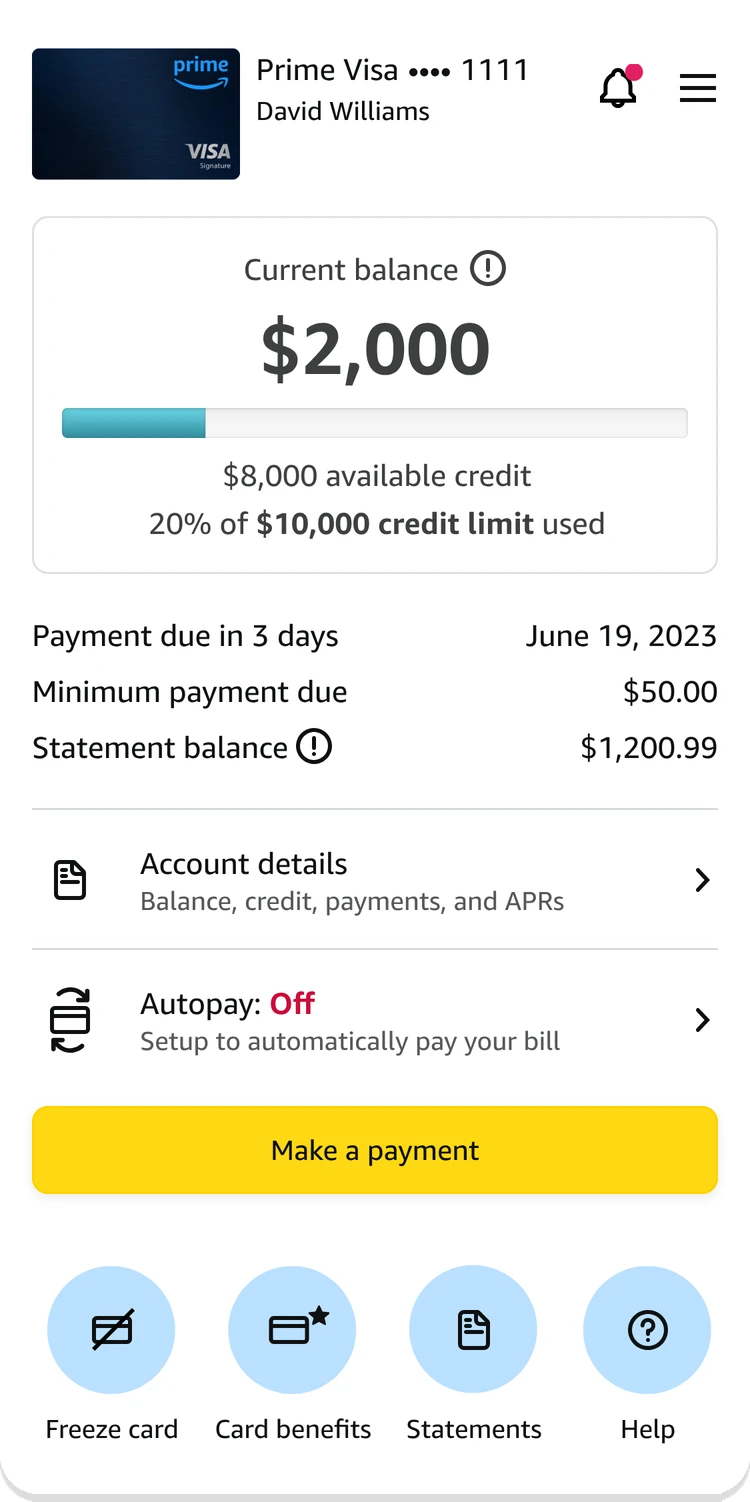
Top fold
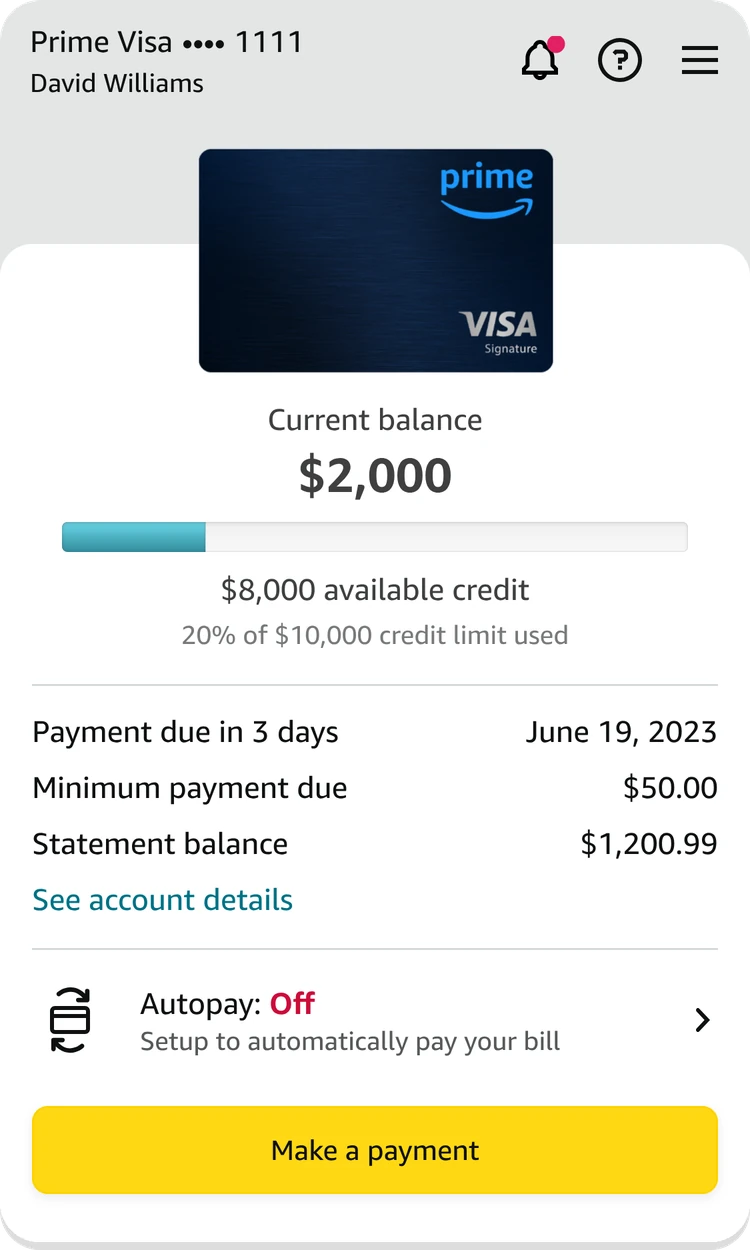
Balance, what’s due and Make a payment, all above the fold. Two versions: compact with quick actions, and card art forward.
Card artSmall, so the numbers lead.
Credit meterHow much of the limit is in use.
Payment summaryDue date first.
AutopayStatus in color. Red when it’s off.
Quick actionsFreeze, benefits, statements, help.
HeaderAlerts, help and menu.
Card forwardThe card art takes the stage.
Account detailsFolded into one link.
Primary CTAMake a payment, always above the fold.
Widget
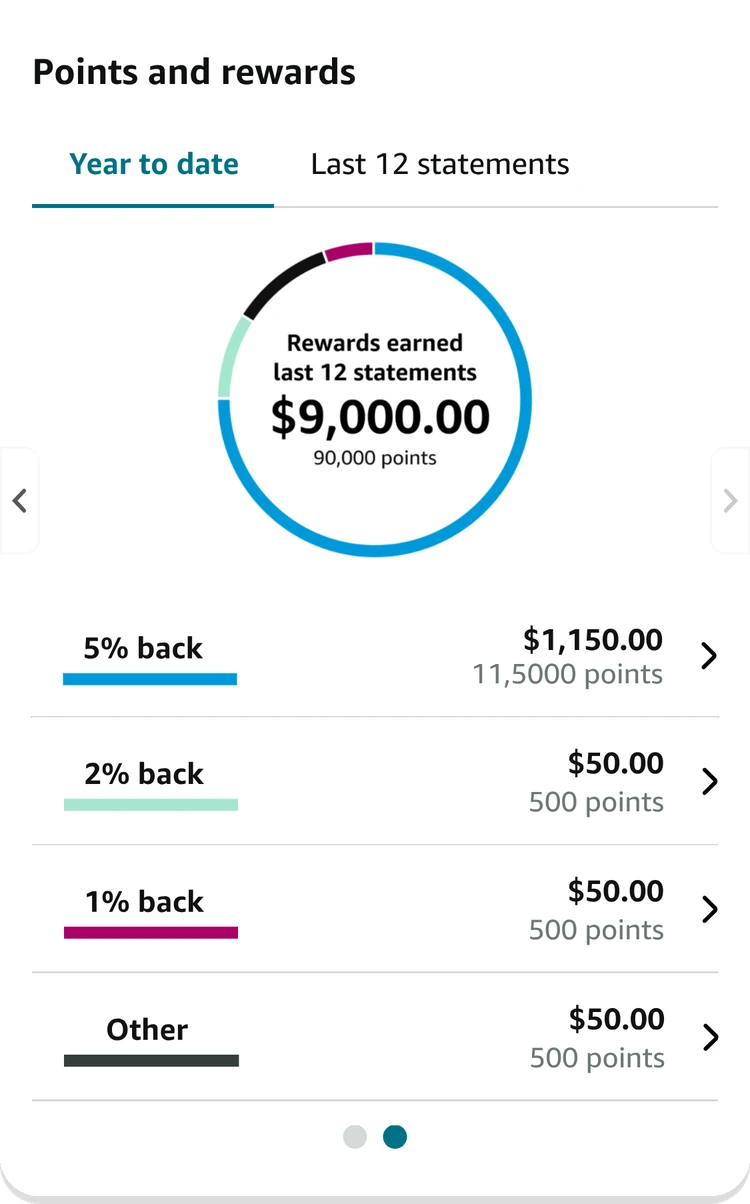
Points & rewards
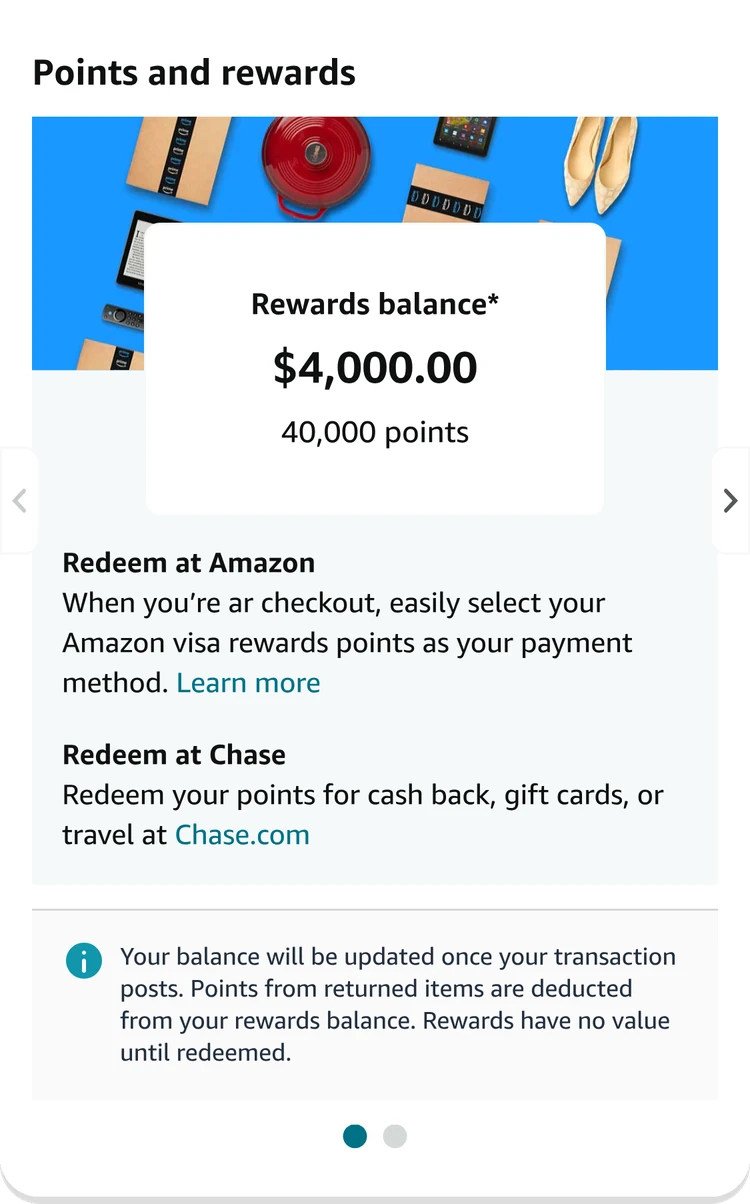
One carousel, two pages. What you have and how to spend it, then what you earned by category.
Rewards balanceDollars first, points under it.
Two ways to redeemAt Amazon checkout, or at Chase.
Fine printKept, but tucked into one info note.
Time rangeYear to date or last 12 statements.
Rewards donutTotal earned, split by category.
Category rowsBar colors match the donut.
CarouselTwo pages, one widget.
Widget
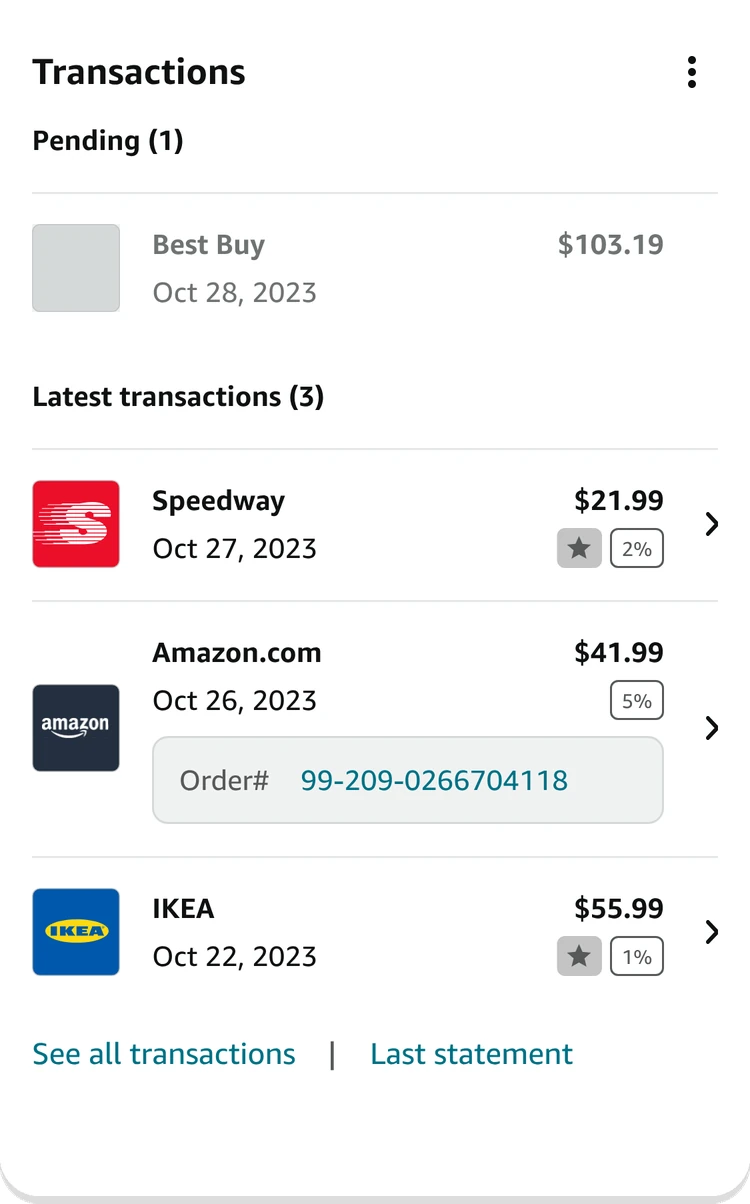
Transactions
Pending first, then the latest three, each with the rewards it earned.
Pending firstCharges still posting sit on top.
Merchant logoFaster to scan than names.
Order linkAmazon orders link straight back.
MenuFilters and export live here.
Rewards earnedThe rate on every charge.
Next stepsAll transactions or the last statement.
Research
Why the old page wasn't working
Before touching layout, I went back to what card members actually come to do, and why the old page got in their way.
1 / 3
Customer needs
Four questions
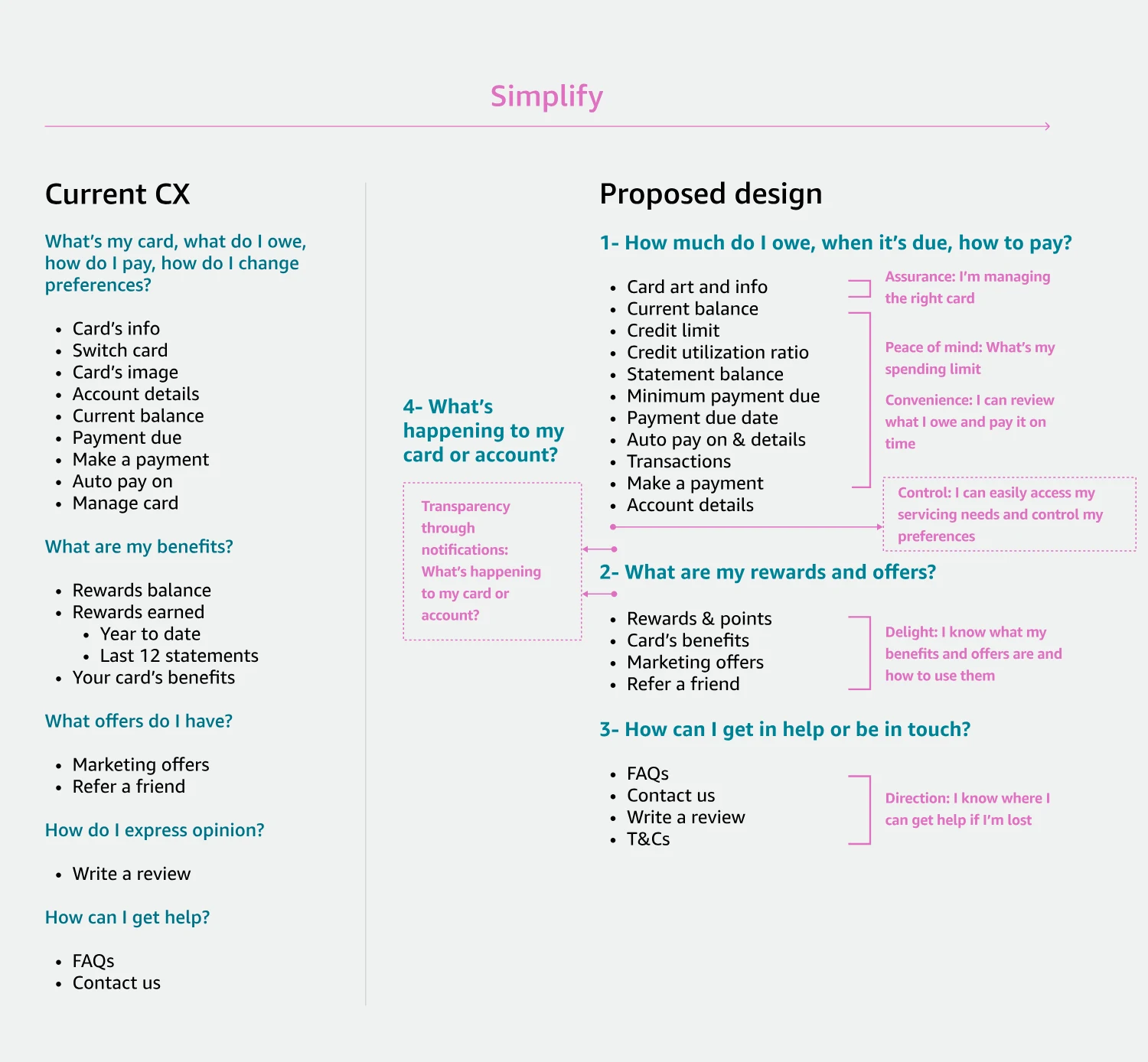
Research with 23 card members sorted their top 10 jobs into four questions: what do I owe, what are my benefits, where do I get help, and what’s happening with my account. The page is organized around them, in that order.
From the project
Customer problems
Nobody could find anything
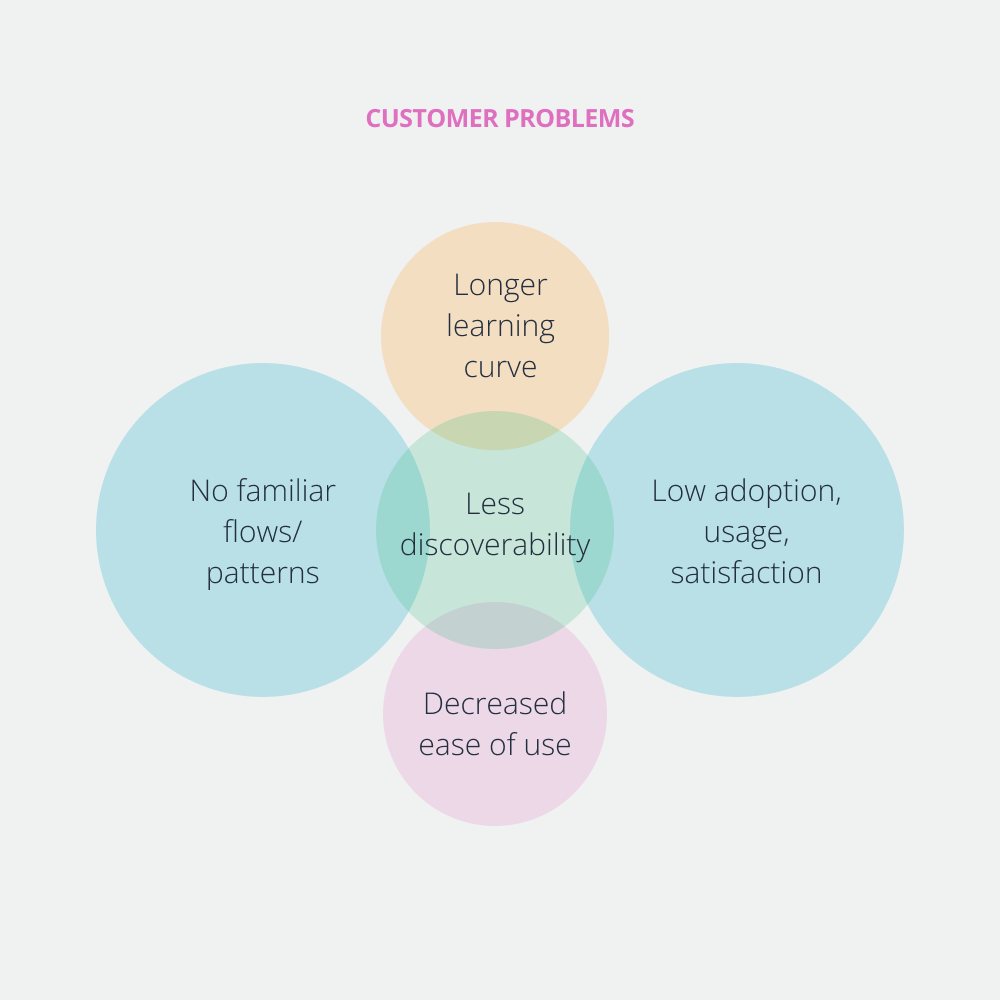
A long learning curve, no familiar patterns, low adoption and a page that was hard to use all compounded into one problem: discoverability.
From the project
Navigation
Five menu patterns
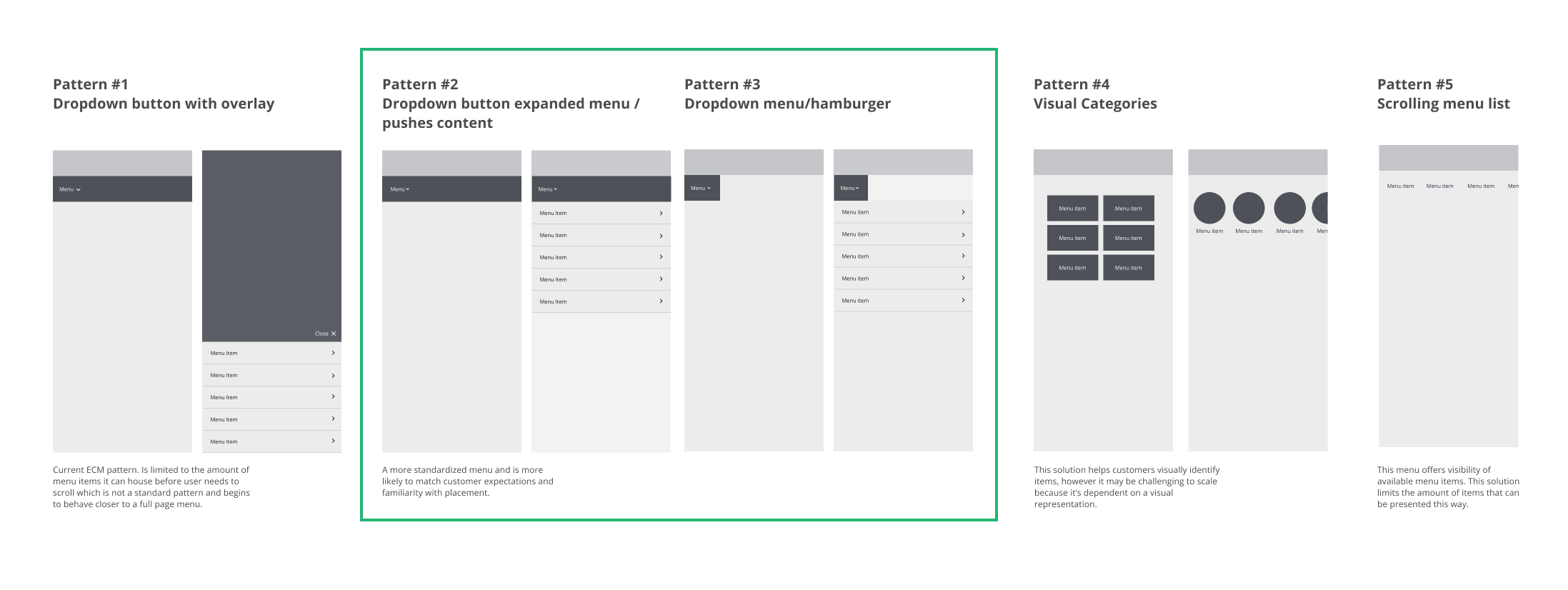
I explored five navigation patterns. A dropdown that pushes content down won, because it matches what customers already expect from payments.
From the project
Design system
One widget, four templates
C3 is made of widgets: one building block with a fixed anatomy that adapts its content to whatever it's showing. Every card member gets a personalized page, with no one-off layouts.
1Section header. The same on every widget.
2Kebab menu. Optional quick links.
3Content area. The only part that changes between templates.
4Links. One or two actions, always at the bottom.
5Section divider. Separates widgets instead of card borders.
The widget building block.
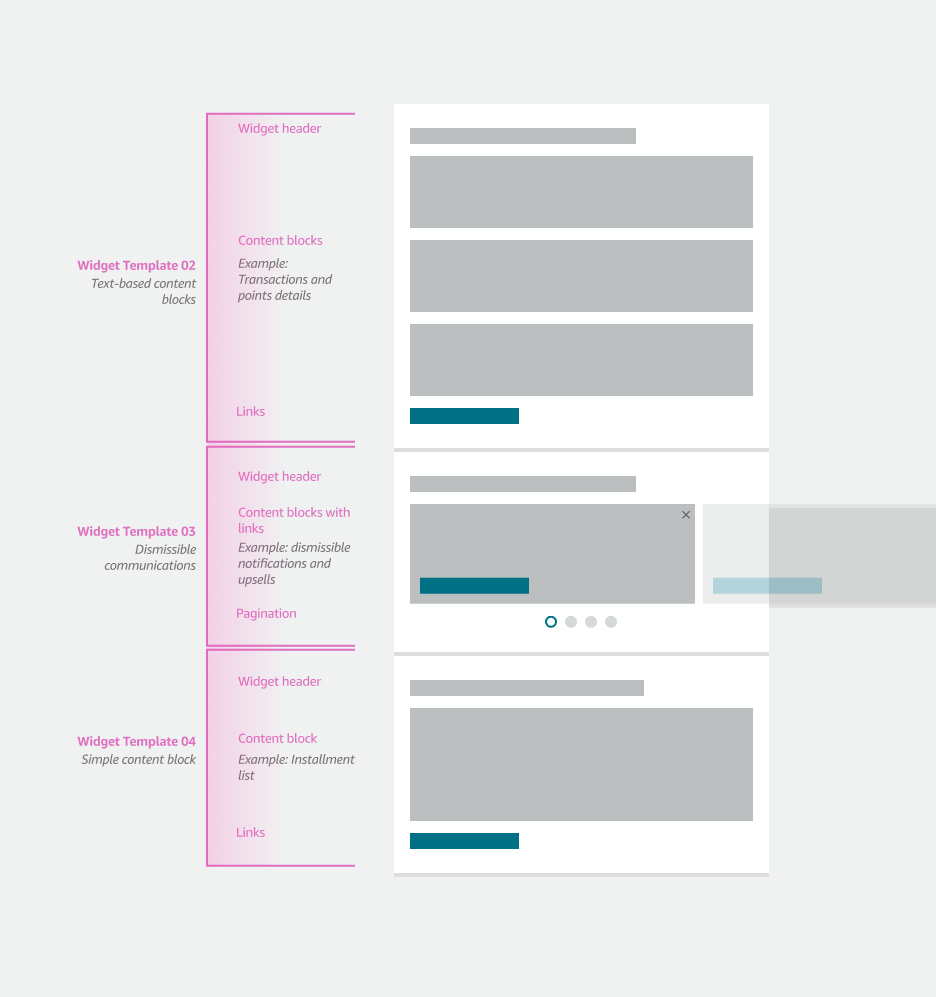
Four templates cover everything on the page. Pick one:
Template 01, simple content. One content block, like the account banner, transactions or benefits.Template 02, image and content. Card art beside its details. The header can hide.Template 03, two columns and a CTA. Balance details with a full-width primary action.Template 04, scrollable. Dismissible offers and notifications, with pagination.
Top bar
Prime Visa •••• 1111David Williams
Chips / Tags
Buttons
Status / Alerts
A minimum payment of $50.00 for your Prime Visa ending in 1111 is due in 3 days
Verify via Chase to see transactions, installments details and other servicing features.
Components
Meter
Progress
Toggle
Checkbox
Radio
Calendar
November 2025
Charts
ChartsThis Week ▾
5,000.00
59 Orders
JanFebMarAprMayJun
Navigation
Card art
Balance
Current balance
$2,000
$8,000 available credit
20% of $10,000 credit limit used
Payment due in 3 daysJune 19, 2023
Minimum payment due$50.00
Statement balance$1,200.99
The component library, rebuilt in live code. Tap around: the chips, the controls, the calendar, the card, and Make a payment.
Architecture
Fixed on top, flexible below
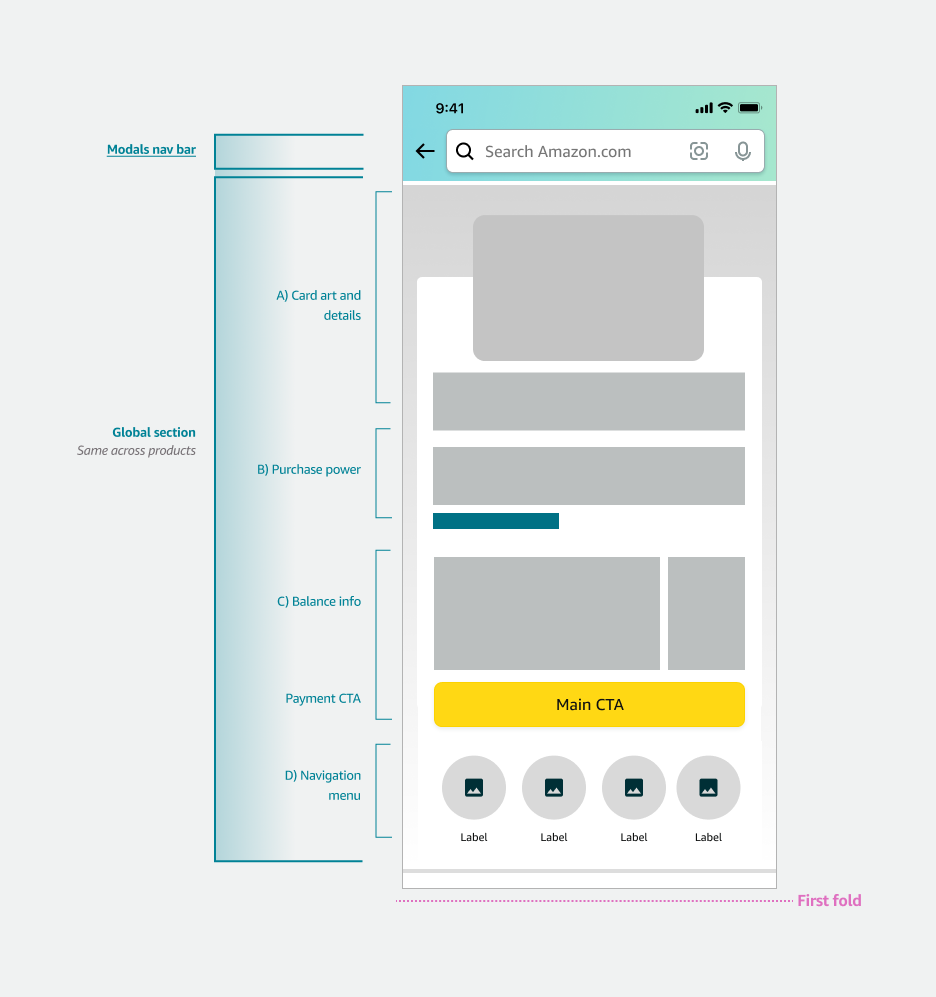
The page splits into a global section that's the same for every card, and a widget zone that changes per card member.
1 / 3
Structure
Fixed on top
Card art, purchase power, balance, the payment CTA and navigation stay put above the first fold, the same for every card.
From the project
Structure
Flexible below
Under the fold, widgets stack in whatever order suits the card member, built from the four templates.
From the project
Decision
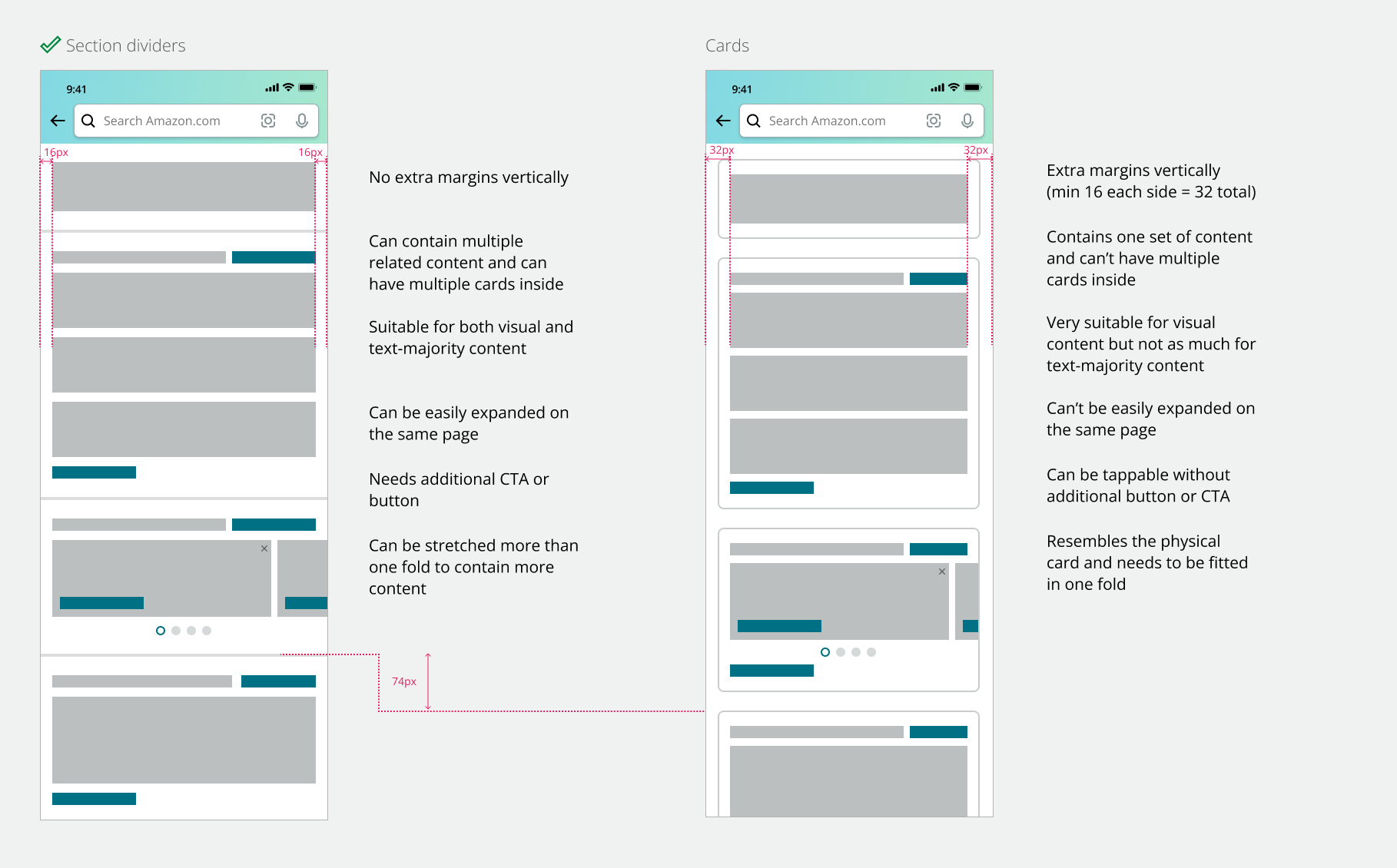
Dividers, not cards
Section dividers beat cards. They hold multiple items and text-heavy content, match where Amazon Shopping is heading, and give back 32px on every section.
The card hub shipped in spring 2024 and is live in the Amazon Shopping app. Where C3 has shipped, NPS rose 15 points, and new features arrive as widgets instead of redesigns.
For teams, reusing C3 cut development from 6 to 8 months to 2 to 3, saved 12 engineering weeks on the baseline build and halved design approvals. It's designed to extend to more than 20 Amazon payment products, all on top of Pay Studio.
 From the project
 From the project
 From the project
 From the project
 From the project
 From the project